







There's a ton of information out there about buying stocks. Unfortunately, there's far less information about selling stocks.
That’s a mistake, as the sale is when you actually make money. Getting it right can be key to claiming your profits — or, in some cases, cutting your losses.
How do you sell stock?
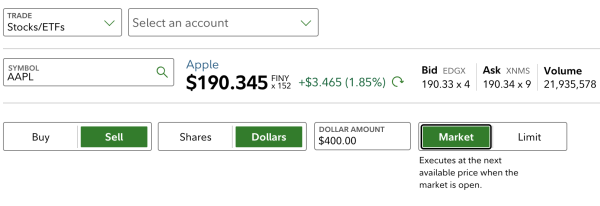
You sell stock by placing an order with your broker. You fill out an order form that will ask what stock you want to sell, if you want to sell in shares or dollars, how much you want to sell, and if you want to sell via a market or limit order. Ideally, you'll be selling the stock after it has grown in value from when you bought it, locking in a profit. The stock-selling order form will look something like this:
3 steps to selling stocks
1. Know when to sell stocks
When you sell depends on your investing strategy, your investing timeline, and your tolerance for risk.
Sometimes though, loss aversion and fear get in the way. There are good reasons and bad reasons to sell stocks. Check your emotions when you're ready to pull the trigger.
Brokerage firms | |
|---|---|




Ongoing poor performance relative to the competition, irresponsible leadership and management decisions you don’t support may all make the list of good reasons. Maybe you’ve decided your money would do better elsewhere, or you’re harvesting losses to offset gains for which you’ll owe income taxes.
Bad reasons typically involve a knee-jerk reaction to short-term stock market fluctuations or one-off company news. Bailing when things get rocky only locks in your losses, which is the opposite of what you want. (You know the saying: Buy low, sell high.) Before you sell, think about why you bought the stock in the first place. Did you consider what news or circumstances would make you sell it? Go over your reasoning to ensure you’re not giving in to an emotional response you might later regret.
» Prone to emotional investing? Check out robo-advisors

2. Decide on an order type
If you’re familiar with buying stock, you’re familiar with selling it — the options for order types are the same. The goal, however, is different: You use order types to limit costs on the purchase of stock. On the sale, your main objective is to limit losses and maximize returns.
Order type | What it is | Use it if... |
|---|---|---|
Market order | A request to buy or sell a stock ASAP at the best available price. | You want to unload the stock at any price. |
Limit order | A request to buy or sell a stock only at a specific price or better. | You're fine with keeping the stock if you can't sell at or above the price you want. |
Stop (or stop-loss) order | A market order that is executed only if the stock reaches the price you've set. | You want to sell if a stock drops to or below a certain price. |
Stop-limit order | A combination of a stop order and a limit order: A limit order is executed if your stock drops to the stop price, but only if you can sell at or above your limit price. | You want to sell if a stock drops to a certain price, but only if you can sell for a minimum amount. |
Let’s go through some examples. Say you have a stock with a current market price of $40.
Market order
The order will execute within a few seconds at market price. You may sell for $40, slightly more or slightly less — stock prices can fluctuate in the time it takes to place and execute the order.
The risk: Your stock could sell at any price, with no restrictions.
Limit order
You set a limit price and the order will execute only if the stock is trading at or above that price. If your limit order is for $41, your order will execute only if the stock trades at or above $41.
The risk: You could end up not selling if the stock never rises to your limit price.
Stop-loss order
You set a stop price and your order will execute only if your stock begins trading at or below that price. If your stop price is $38, your order will execute as a market order if the stock price falls to $38 or less.
The risk: You could sell for less than your stop price — there is no floor. Also, a temporary drop in price may trigger a sale when you don’t want it to.
Stop-limit order
You set both a stop price and a limit price. If your stop price is $39 and your limit price is $37, your order will execute as a limit order at or above $37 if the stock’s bid price drops to $39.
The risk: You’ve added a floor, but if the stock drops below it too quickly — which can happen in a volatile market — you may not sell at all.
» Dive deeper: Read the secret to how to make money in stocks.
3. Fill out the trade ticket
Assuming you’re selling through a broker, the broker’s website or trading platform will have a trade ticket or order you’ll need to fill out to initiate the sale. In most situations and at most brokers, the trade will settle — meaning the cash from the sale will land in your account — two business days after the date the order executes.
Filling out the trade ticket is a quick process: You’ll select sell, plug in the symbol of the stock, the number of shares, your order type (and limit or stop price, if applicable) and what’s called the “time in force” or order expiration: essentially, how long the order should remain open.
Your choices for time-in-force depend on order type, but common options are:
- Day: The trade will cancel and the order expire if not filled by market close. This is typically the default.
- Good-Til-Cancelled: The trade remains active until filled or canceled, though brokers typically limit how long investors can leave a GTC order open.
- Immediate or cancel: An order that must be filled immediately; otherwise, the order or any portion of it that is not filled will be canceled.
- Fill or kill: Typically used when trading a large number of shares. If the entire order isn’t filled immediately, the trade will be canceled.
- On the open: Fills at the market’s opening price.
- On the close: Fills at the market’s closing price.
In most cases, it’s fine to leave the default day selection in place here. As you get more comfortable with stock trading, you can start to explore your options.
Make sense of the markets with The Nerdy Investor
A weekly wrap on what's moving markets, plus two monthly deep-dives on how to improve your investing, straight to your inbox.

Once you have all fields filled, give the whole ticket another read before hitting submit — you don’t want to accidentally sell Apple when you meant to sell Applebee’s.
» Ready to get started? Read our primer on how to open a brokerage account.